
Stop wasting ad spend on out-of-stock products
SpendGuard tracks Shopify inventory and pauses the ads you select when stock drops — then resumes them when stock recovers, with a clear audit log.
Set up in under 2 minutes
Connect Google + Meta, pick what to protect, you're live.
Features
Prevent out-of-stock ad waste
Monitor first. Automate when you're confident.
Real-time inventory monitoring
Tracks Shopify inventory via webhooks. Detects stock drops within seconds.
Automatic pause & resume
Pauses selected ads when stock drops below your threshold. Resumes when stock recovers.
Full audit log
Every action is logged with timestamps and reasons. Review what happened and when.
Safety-first controls
Only acts on ads you select. Never resumes manually paused ads. Kill switch available anytime.
If you spend $200/day and a product is OOS for 2 days, that's ~$400 of clicks that can't convert.
That's not a projection — it's math. SpendGuard catches these moments automatically.
The problem
Why not feeds or manual pausing?
Because stockouts don't wait — and brittle automation fails silently.
Manual pausing is too slow
Stockouts happen overnight and on weekends. By the time you notice, spend is gone.
Feed sync can lag
Feed updates and mapping aren’t always immediate. Delays can keep spend running on OOS items.
SpendGuard is selective and logged
You choose what’s protected. We pause/resume only at the level you select and log every action.
How it works
Three steps to protect your ad spend
Simple setup. Fully automated after that.
Choose what to protect
Select the ads you want SpendGuard to control and pick the products they depend on.
Set your stock rules
Set a pause threshold and a resume threshold. You stay in control — SpendGuard only acts on what you selected.
We pause, resume, and log everything
When stock drops, SpendGuard pauses those ads. When stock recovers, it resumes them — with a clear audit log of every action.
See it in action
Inside SpendGuard
Screens from the app: guard setup, audit log, and kill switch — so you know exactly what happens.
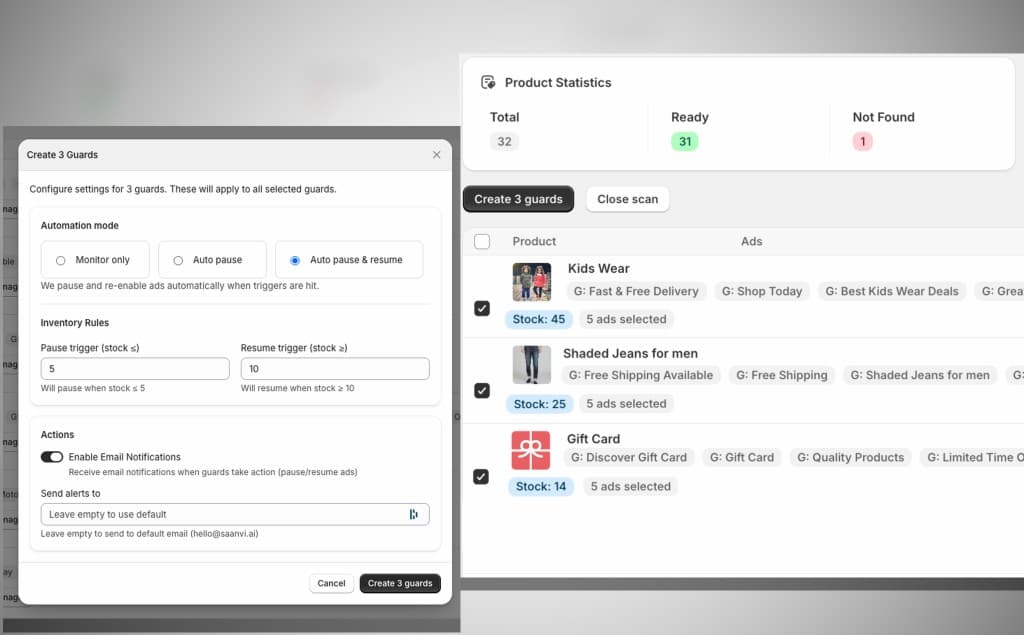
Guard setup
Pick ads, set thresholds
Choose what to protect (campaigns, ad groups, or ads), then set pause + resume thresholds.
Choose the level: campaign, ad group, or ad — and set pause + resume thresholds.
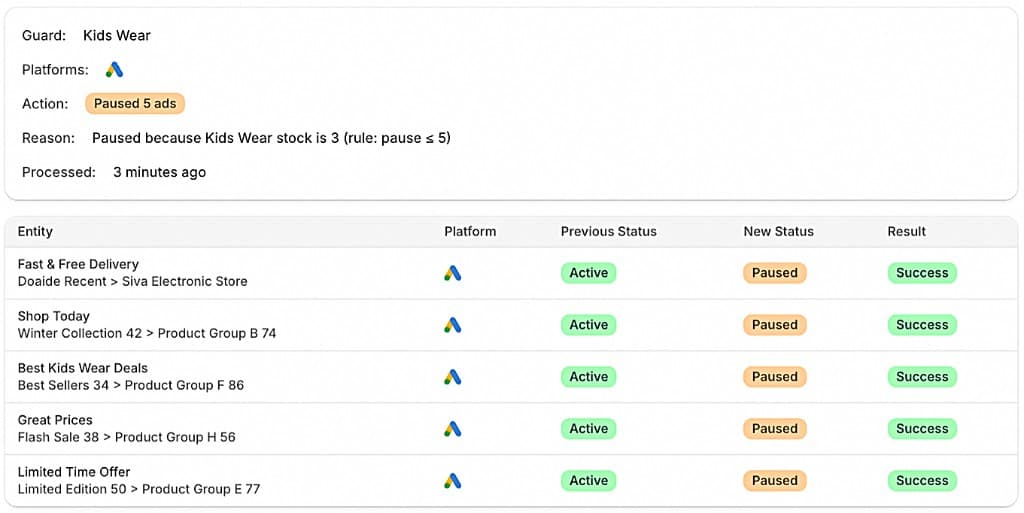
Audit log
Every action, logged
See exactly what SpendGuard did and why. Every pause, resume, and no-action event is recorded with timestamps.
Every pause/resume (and no-action) is recorded with a reason and timestamp.
Security
Security & Guardrails
SpendGuard is designed to minimize risk while automating out-of-stock protection.
Secure OAuth (no passwords)
Connect Google Ads and Meta Ads via OAuth. We never ask for or store your passwords.
Minimal permissions
We request only the access needed to run your guards and let you review it during connect.
Status-only automation
We only pause/enable the ads you select. No bids, budgets, targeting, or creatives are edited.
You’re in control
Disable a guard or disconnect anytime. You decide what’s protected and when automation runs.
Integrations
Connects with your stack
Works with Shopify inventory + Google Ads + Meta Ads
Google Ads
AvailablePause and resume Search, Shopping, Display, and Performance Max campaigns automatically.
Shopify
AvailableReal-time inventory tracking via webhooks. Supports products and variants.
Meta Ads
AvailableControl Facebook and Instagram ad sets based on your Shopify stock levels.
Why SpendGuard
The alternative to guesswork
Most teams either react too late or rely on fragile automations.
Misses weekends + overnight stockouts
Brittle; can break silently; limited audit trail
Latency + mapping gaps; not built for ad-level control
Selective control + audit log + kill switch
Free during early access
Early access pricing will be simple — based on the number of protected campaigns and connected stores. Founding merchants get locked-in pricing when we launch.
No credit card required to join the waitlist.
Get started
Install SpendGuard
Install from the Shopify App Store, connect Google + Meta, and protect your ads from low-stock waste.
Set up in under 2 minutes
Connect Google + Meta, pick what to protect, you're live.
FAQ
Common questions
Everything you need to know about SpendGuard. Can't find what you're looking for? Reach out to our support team.